Ask for a moment, and protect focus.
In Dazr Teams you can call straight away, or knock first and ask for a moment. You give a reason and how long it takes, they answer in one tap, and focus time holds every knock until they are done.
Dazr Teams is included in Dazr Pro and Enterprise.
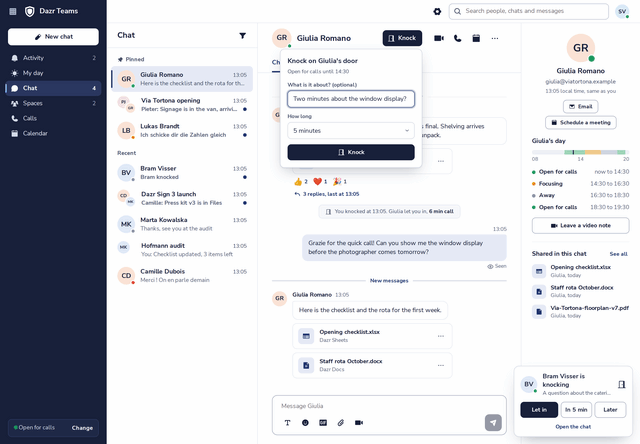
How a knock works.
Open the chat, press Knock and say what it is about and how long it takes. Two minutes, five, fifteen.
A card shows up for them with your reason: Let in, In 5 minutes, or Later. Focusing? The knock waits until their focus time ends.
When they let you in, you talk. The chat keeps a short note of the knock and the answer.
Focus time that holds.
Block time to think, and Dazr Teams keeps it free.
With Hold knocks while I focus, knocks gather quietly in My day and show up when your focus time ends.
Your day line shows Focusing, so people know to write instead of knocking.
Focus time and the hours you are open for calls come from your availability in Dazr Calendar. Set them once a week.
My day, in one place.
The meetings, knocks and video notes of today, on one screen.
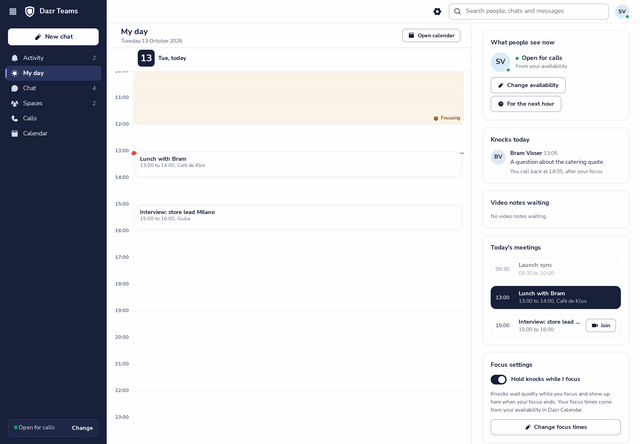
Your current availability, the way your colleagues see it, with a quick change for the next hour.
Every knock with its reason, answered or still waiting, with Let in and In 5 minutes right there.
Video notes you haven’t watched yet, and today’s meetings with Join for the ones that are about to start.
Questions about knocking.
Can I still just write a message?
Of course. Knock is for when you want to talk. A message is always fine, and it never interrupts focus time.
What if it is urgent?
Then call straight away. If you knock, say so in the reason, and your colleague can let you in at once.
Do knocks work across companies?
Knocks work between everyone you chat with in Dazr Teams.
Fewer interruptions, starting today.
Dazr Teams is included in Dazr Pro and Enterprise.
Knock and focus timeSwitching to Dazr TeamsPricingDazr MailQuestions? Contact us