European team chat.
Chats, spaces, channels, threads, files and video notes for your whole company, plus what Slack and Microsoft Teams don’t have: a knock to ask for a moment when a call can wait, and focus time that holds every knock until you are done. Built in Italy, under European law.
Included in Dazr Starter, Pro and Enterprise. 14 days free, cancel any time.
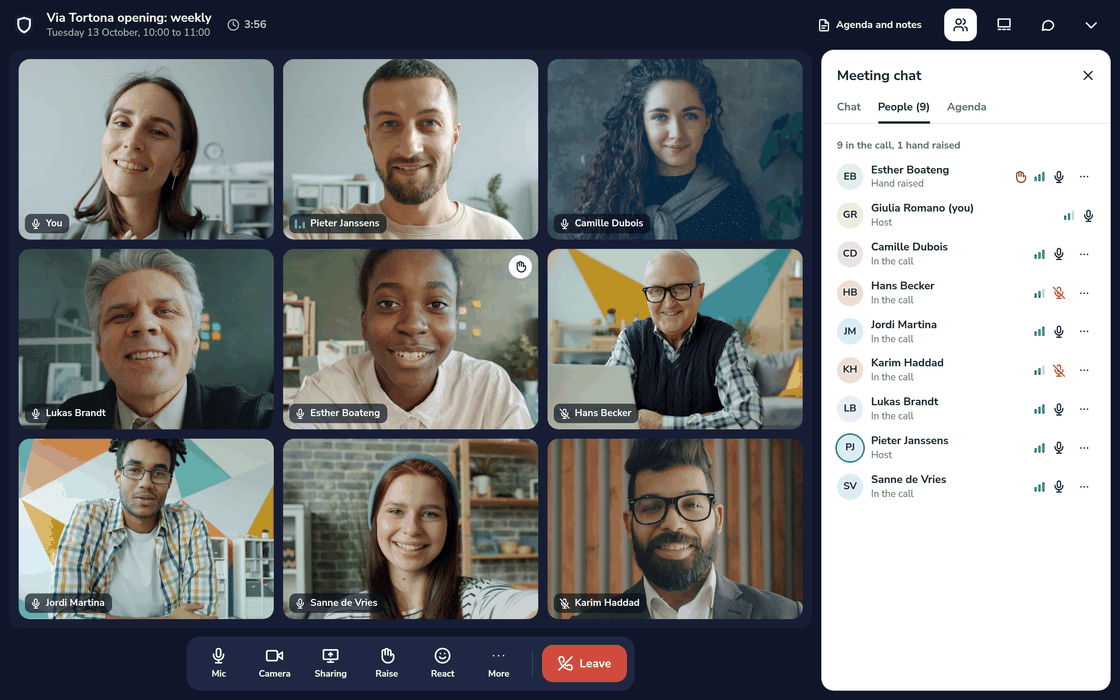
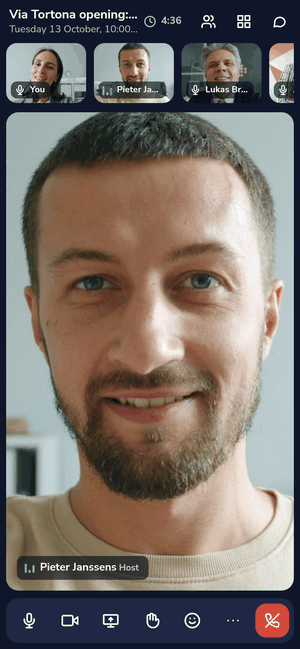
A meeting with nine people, one hand raised and the People panel open. On the right, the same meeting on a phone.
The complete team chat.
One-to-one chats and group chats, pinned at the top or in Recent, with drafts that wait for you.
Your company’s space with channels for each topic, posts with threads, and everyone in the organisation inside.
Reply in a thread, edit or delete what you sent, mark a chat as unread, and save messages to find them again.
Share documents, sheets and slides straight from Dazr Files. Before your own file goes out, Dazr Teams asks who may open it.
Record a short video instead of a long message, for when showing is faster than typing.
Plan a meeting from a chat and it is in everyone’s Dazr Calendar, with a card in the chat.
React with emoji, mention people with @, format with bold and lists, and send pictures and GIFs.
Find people, chats and words in every message from the bar at the top.
Desktop notifications for every message, for mentions only or for nothing. Mute a chat, or set Do not disturb and nothing interrupts you.
“Seen” under your message, both ways. Turn it off in the settings, and you don’t see theirs either.
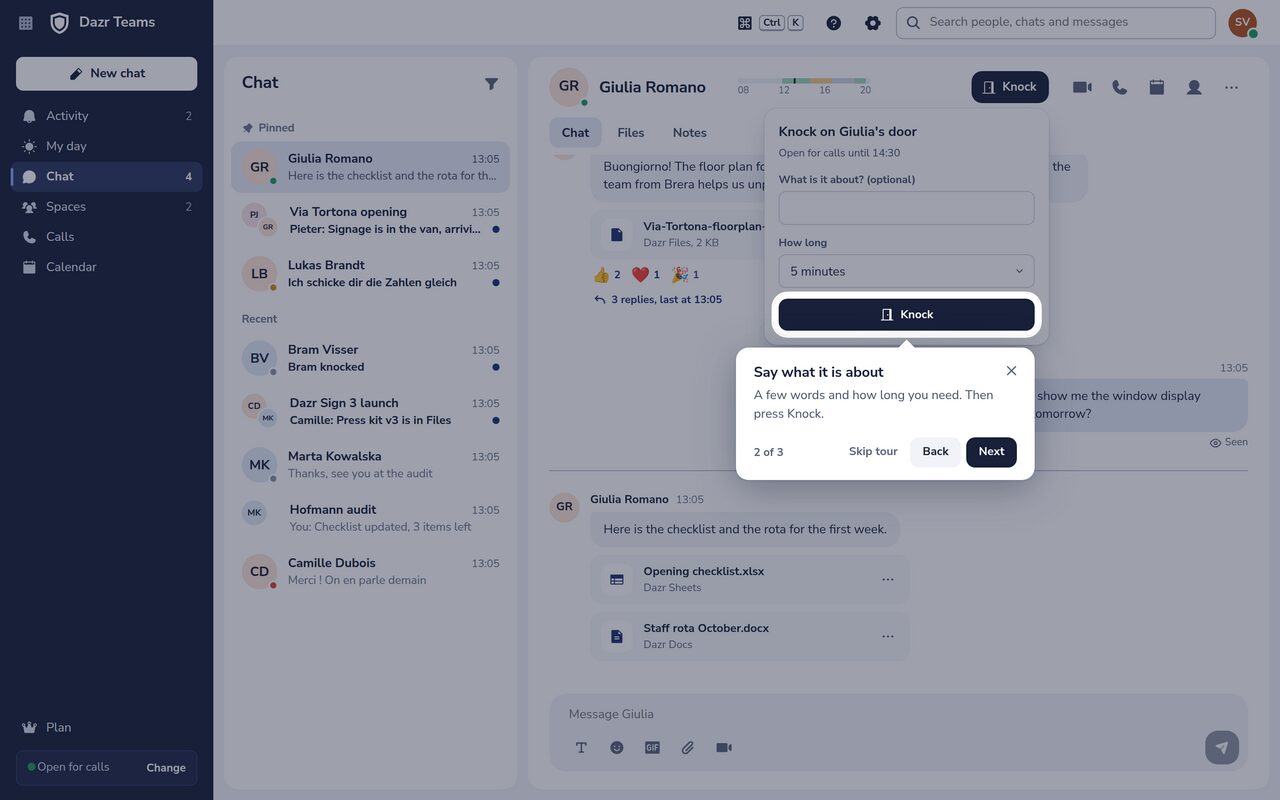
Call now, or knock first.
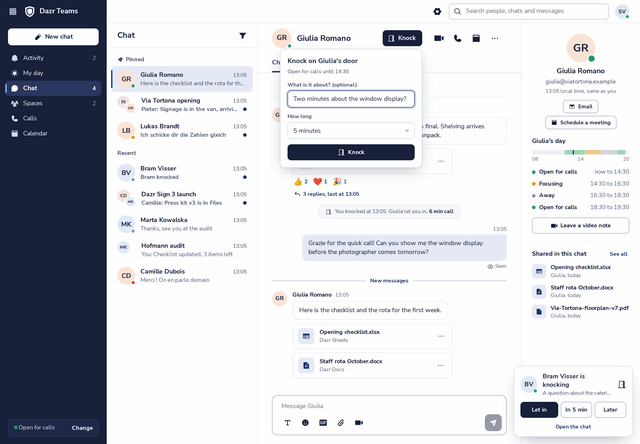
Knock with a short reason and how long it will take, for example two minutes about the window display.
Let in, In 5 minutes or Later. While they focus, knocks wait quietly until they are done.
The chat keeps the knock and its answer, so nobody has to wonder.
Knocks and focus time work hand in hand. Knock and focus time
Everyone’s day at a glance.
Availability comes from the calendar people already keep, not from a status they forget to change.
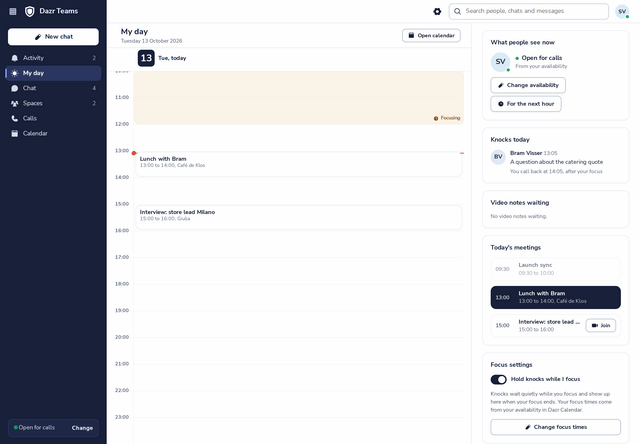
Next to every chat: when someone is open for calls, focusing or away today, from their availability in Dazr Calendar.
The dot on someone’s photo follows their day and their meetings by itself.
Open for calls, Busy, Do not disturb, Be right back or Appear away, with a short message that clears itself at the time you choose.
Guided tours and help.
Knock before a call, set your focus time or start a channel: open Help, the ? at the top, and a guided tour shows you each step on the real screen, in your language.
For everything else, the help centre has a step-by-step article with real screenshots.
Built and stored in Europe.
Chat is where work happens. Dazr Teams keeps it in Europe.
Messages and files are stored encrypted on European infrastructure, by an Italian company, under European law.
The admins of your organisation in Dazr Identity choose who is on the plan and who is in its space.
There are no ads in Dazr Teams, and your conversations are never used for advertising.
Looking for a European alternative? Dazr Teams and Microsoft Teams Dazr Teams and Slack Business chat for your company
The data processing agreement is included in every company plan. More in the trust centre.
Video calls and meetings.
Video and audio calls inside Dazr Teams, from any chat or your calendar, hosted in Germany.
Start a video or audio call from a chat, or knock first and call once they let you in.
Share your screen, or open a document, sheet or slides from Dazr Files that everyone sees live and can edit.
Calls come with Starter (up to 25 people, 60 minutes each), Pro (up to 50 people, 9 hours each) and Enterprise (no limits), at no extra cost.
Questions and answers.
Which plan includes Dazr Teams?
Dazr Starter, Pro and Enterprise. Starter costs €9 per person a month, for 1 to 10 people; Pro costs €19 per person, for 3 to 100 people; Enterprise costs €29 per person, from 10 people. All three include Dazr Mail on your company domain, Calendar, Contacts, Files and Docs, Sheets and Slides. See pricing
Can I chat with people outside my company?
You can invite anyone by email. They join once they sign in to Dazr with that address and have a seat on a Starter, Pro or Enterprise plan. Guests can join a meeting from a link in their browser, without an account, and wait until a host lets them in.
Do I need to install anything?
No. Dazr Teams runs in the browser on your computer and your phone, and it can show desktop notifications.
How does Dazr Teams know when I am free?
From your availability in Dazr Calendar: the hours you are open for calls, your focus time and your meetings. You set it once and change it when you like.
Are video calls included?
Yes. Video and audio calls are included in Starter (up to 25 people, 60 minutes each), Pro (up to 50 people, 9 hours each) and Enterprise (no limits), and on Enterprise you can record meetings to Dazr Files.
Bring your company together.
Start free and invite your colleagues. They are in as soon as they sign in.
Knock and focus timeSwitching to Dazr TeamsPricingDazr Teams and SlackDazr MailQuestions? Contact us